From Tracked Work to Professional Invoices
Smart Invoicing transforms your approved time entries and billable expenses into polished invoices in minutes — not hours. No more manual data entry, no more missed billable work.
How Smart Invoicing Works
From tracked work to sent invoice in four steps
Track Time & Expenses
Track time on tasks with billable rates using built-in timers or manual entries. Mark project expenses as billable to a client. Time entries must be approved before they're eligible for invoicing.
Open Smart Invoicing
Navigate to Invoices → Smart Invoicing. The system shows all projects and clients with uninvoiced billable work — both time entries and expenses. Select a project or client and optionally filter by date range.
Choose Your Grouping
Pick how your time entries appear as line items. Billable expenses always appear in a separate section alongside your time-based suggestions.
- By Project + Task (most detailed)
- By Project (high-level summary)
- By Team Member
- By Date Range (weekly)
- Individual Entries (every entry as a line item)
Review & Create
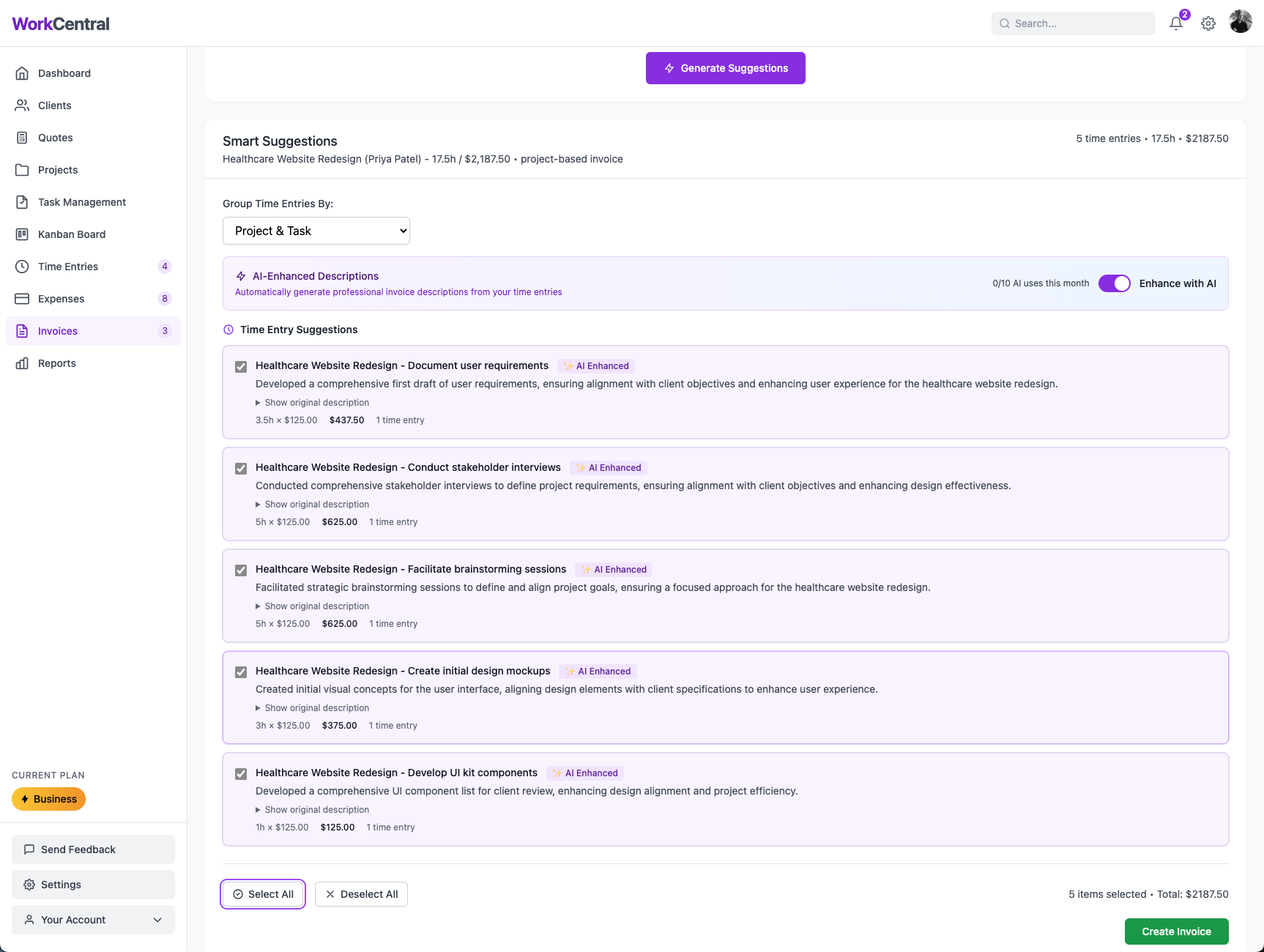
Select which suggestions to include, edit descriptions and amounts as needed, optionally enhance descriptions with AI, and create your invoice. Time entries and expenses are automatically marked as invoiced and locked from editing.
Why This Matters
Hours Reduced to Minutes
Manual invoice creation with line-item research takes 30+ minutes. Smart Invoicing does it in 2.
Nothing Slips Through
Every approved billable time entry and expense is surfaced. No more forgetting to bill for work you did last month.
No Double-Billing
Time entries and expenses are automatically tracked as invoiced or uninvoiced. Once on an invoice, they can't be billed again.
AI-Enhanced Descriptions
Turn "Fixed bug in auth controller" into "Resolved authentication system issue to ensure secure user login experience."
One-click AI enhancement rewrites technical time-entry descriptions into professional, client-facing language. Requires your own OpenAI API key (Pro plan and above).
Mistakes Are Recoverable
Void and re-bill with confidence
Automatic Tracking
When an invoice is created, all linked time entries and expenses are automatically marked as "invoiced" and locked from editing. No manual bookkeeping needed.
Void & Release
Need to redo an invoice? Void it and all linked time entries and expenses are released back to uninvoiced status — immediately available for re-billing on a new invoice.
Smart Invoicing by Plan
Free
Get started at no cost
- Up to 10 invoices/month
- Smart Invoicing included
- All 5 grouping options
- Billable expense support
Professional
$18/mo or $15/mo annual
- Up to 50 invoices/month
- Smart Invoicing + AI enhancement
- AI descriptions (bring your own OpenAI key)
- Payment reminders
Business
$36/mo or $30/mo annual
- Unlimited invoices
- Everything in Professional
- Team approval workflows
- Full team collaboration
Why Smart Invoicing Changes Everything
Eliminates Manual Data Entry
Stop copying time entries into spreadsheets and reformatting them for invoices. Smart Invoicing pulls approved time and billable expenses directly, pre-populates everything, and calculates totals automatically.
Present Work Your Client's Way
Five grouping options let you show work by project, task, team member, date range, or individual entry. Some clients want a high-level summary; others want every detail. Smart Invoicing handles both.
Professional Language, Automatically
AI-enhanced descriptions turn your internal task notes into polished, client-facing language. "Fixed bug in auth controller" becomes a professional description your client actually wants to read. Requires your own OpenAI API key (Pro+).
Approval Pipeline Built In
Only approved time entries and expenses flow into Smart Invoicing. This ensures every line item on your invoice has been reviewed for accuracy before it reaches your client.
Stop Spending Hours on Invoices
Smart Invoicing is included on every plan, including Free